
Prepare for Your Classes
Use the Digital Materials Guide below to see which courses require books and how to access them.
- Digital Materials
- These are synced directly to your Canvas courses.
- You must register your materials before they expire to keep access.
- Digital Materials Registration Deadline: September 15, 2026
- Physical Books
- Shipped during the first week of classes to the mailing address listed in your UF account.
- Double‑check your address in your one.uf.edu profile. Be sure to include apartment, lot, building numbers and exact street address information.
- Disregard any emails from the UF Bookstore indicating that you have a bookstore deferment and/or financial account available for use. You cannot use Bookstore credit as a dual enrollment student.
- Any materials already purchased using personal funds or bookstore credit need to be returned to the UF Bookstore for a refund or you will be held responsible for the cost.
- Only materials obtained through the steps outlined in this guide will be provided free of charge.
Digital Materials Instructions
Textbook Ordering DO’s and DON’Ts
- DO NOT rent or buy books with your own payment — all materials are automatically delivered to you.
- DO NOT order recommended textbooks and materials. Only required materials are covered by the program. If you order physical items (notebooks, paper, tech items, etc.) from the UF Bookstore, you will be responsible for those charges.
- DO NOT delay in requesting course changes — returning and reordering books can delay access to materials.
- DO know that your course materials are free of charge.
- DO register your digital materials using this guide before the September 15th deadline.
- DO reach out with questions on materials: 352‑273‑4155 or dual-enrollment@dce.ufl.edu.
Registering Textbooks: Digital Materials Overview
- Digital course materials will be automatically opted in for you by the first day of classes.
- Register your digital materials via the UF All Access website: bsd.ufl.edu/allaccess.
- Follow the instructions in your course syllabus for how/where to access your e‑book.
- Note: Newly enrolled students or those who recently changed classes will have their digital materials synced within 24–48 hours after the enrollment update is processed.
- Codes to register your digital materials will be displayed at bsd.ufl.edu/allaccess for a limited time after the term begins.
- Register the access code before September 15, 2026 or you will lose access to your free books mid‑semester.
UF All Access
Student Instructions for Registering All Access Materials
Step 1
Start here https://bsd.ufl.edu/allaccess
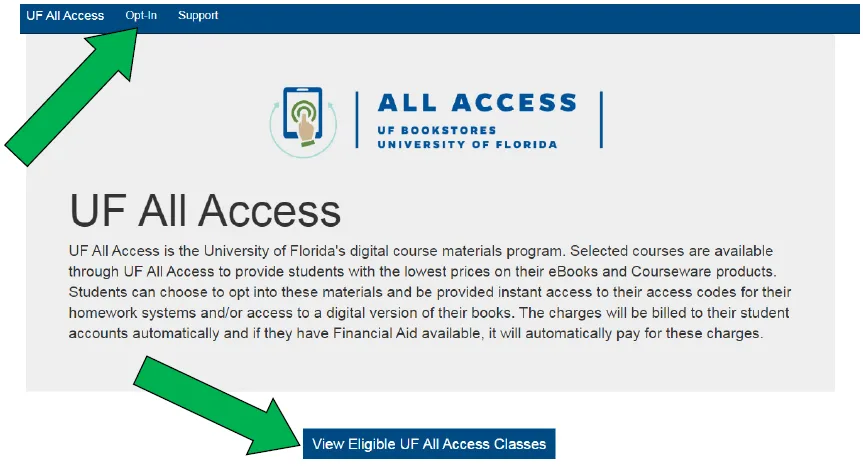
- Click the “Opt In” tab or the “View Eligible UF All Access Classes” button
- Log in with your GatorLink account.
Step 2
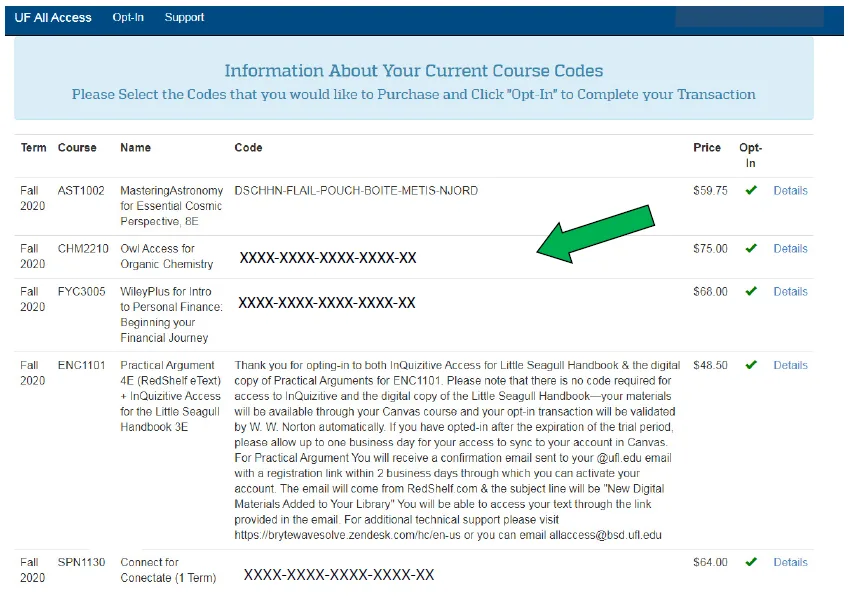
Students are shown a list of classes in which they are enrolled in that are participating in UF All Access with the prices included: UF Dual Enrollment students will not be responsible for these costs. Ignore costs!
- All required textbook and tuition fees will be waived by the end of the semester, DE students are not responsible for paying the fees you see on your one.uf.edu account as a result of opting in for your course materials.
Step 3
The majority of this process is automatic and will already show as check marked/Opted in for you. If not, you can proceed to click the Opt-in check box next to the class.
Step 4
Finalize by clicking the Opt-In button at the bottom.

Step 5
The access code or access instructions are now displayed.
- For Access Codes – Please copy the code and follow your instructor’s specific directions for gaining access to your materials. Typically you will find the instructions on your class Canvas page.
- For Brytewave eTextbooks – You will receive an email to your @ufl.edu GatorMail account within 24 hours of opting in, which will provide you with access to your bookshelf.
Step 6
Digital Materials Registration Deadline: September 15, 2026
The classes that you opted into will continue to be displayed at https://bsd.ufl.edu/allaccess for a limited period of time after the term has started.
UF All Access FAQs
No. UF Dual Enrollment students are not responsible for paying tuition or book fees. You may see tuition and book fees added to your UF student account, but DE students should not make any payment. Fees are paid by your school district. Do not enter personal payment information via All Access. If you are prompted for payment, pause and contact our office at 352‑273‑4155.
UF All Access is UF’s digital course materials program that provides access to eBooks and courseware (access codes). Students are opted in and given instant access; charges are billed to student accounts and automatically paid by school districts before end of term.
New classes usually take 24 hours to appear on the Gator1 Central page. If you need to opt in immediately, email allaccess@bsd.ufl.edu with your UF ID number, Course Code (e.g., MAC 1105), and 5‑digit class # (from your schedule) and the UF All Access team will manually add you.
Digital course materials for dropped classes are automatically refunded within the normal add/drop period.
For students who received physical books and dropped courses, please use the return instructions provided in your shipment to return physical materials back to the store.
For courseware access issues, contact your product’s support and CC the dual enrollment office dual-enrollment@dce.ufl.edu:
- Cengage (MindTap, WebAssign, OWL) — Help & Support for Students and Instructors
- Macmillan (LaunchPad, Sappling) — Macmillan Learning US Support
- McGraw‑Hill (ALEKS, Connect) — ALEKS Support Or Connect Instructor Support
- Pearson (MyLab, Mastering, Revel) — Pearson Higher Education Support
- Wiley (WileyPLUS) — WileyPLUS Support
- W.W. Norton (Smartwork5, InQuizitive) — W.W. Norton Tech Support